
Black Duck Security Advisories
Black Duck Security Advisories (BDSAs) are a proprietary vulnerability data feed curated by the Black Duck Cybersecurity Research Center (CyRC). They provide more comprehensive coverage of vulnerabilities compared to the National Vulnerability Database (NVD), offering timely insights on severity, impact, and exploitability.
BDSAs include actionable remediation guidance, detailing fixed versions, patches, known exploits, and workarounds. Additional validated references can be found under the Technical page of each BDSA record.
The CyRC team conducts thorough research, cross-checking vulnerabilities against affected component versions for accuracy. If a BDSA is not linked to a CVE record, it means further research has determined that the component is not impacted by the vulnerability. BDSAs are updated frequently, often on an hourly basis, to reflect new vulnerabilities.
In contrast to BDSAs, NVD CVE records are not typically cross-validated and may update more slowly. Users should view BDSA records as complementary insights that enhance understanding and decision-making regarding open source security vulnerabilities.
Viewing a BDSA record
To view a BDSA record:
-
Use the Search feature to locate BDSAs.
For example, search for BDSA-2017 to see the list of Black Duck Security Advisories from 2017.
Select a BDSA to view the record.
-
Use the Vulnerabilities tab for a project version to view the vulnerabilities for a project version BOM.
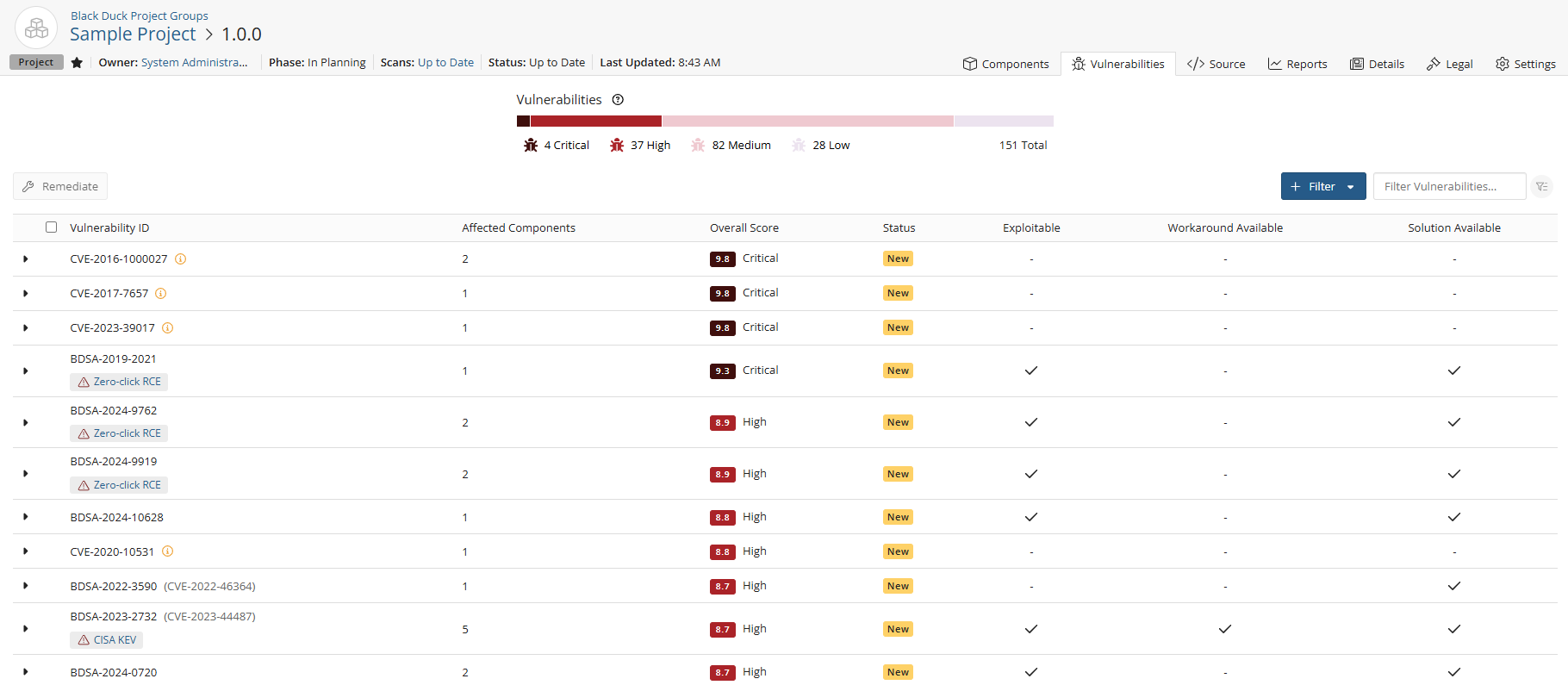
Vulnerabilities with identifiers beginning with BDSA are proprietary findings curated by the Black Duck Security Advisory (BDSA) team.
Click
 next to the vulnerability to reveal additional details. Then click the
View BDSA record link to open the full BDSA record.
next to the vulnerability to reveal additional details. Then click the
View BDSA record link to open the full BDSA record.
Overview tab
By default, the Overview tab appears and displays the following information:
-
The header bar displays the following information:

-
BDSA ID: The unique identifier assigned to the BDSA, which serves as a reference for the specific vulnerability.
-
Related Records: This section lists links to associated Common Vulnerabilities and Exposures (CVE) and European Union Vulnerability Database (EUVD) records, offering users additional context and remediation options related to the same vulnerability or component.
-
Published: The date when the National Vulnerability Database (NVD) published the CVE. This indicates when the vulnerability was officially recognized and made public.
-
Updated: The last modified date by the NVD, reflecting when the CVE record was last updated with new information or corrections.
-
-
The Overall Score graphic provides the following information: represents the
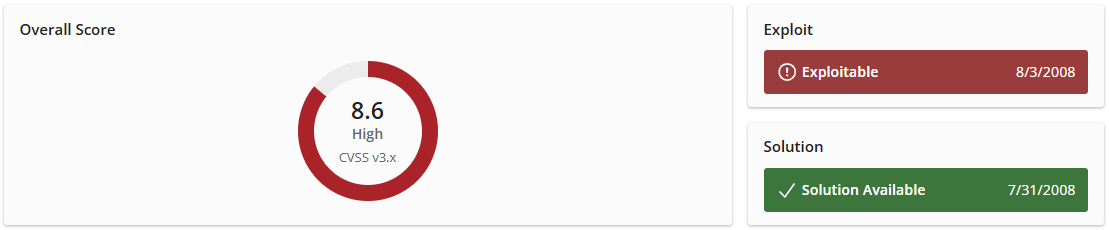
Shown here are the:
-
Common Vulnerability Scoring System (CVSS): Score for the BDSA.
-
Exploit: If a known exploit exists, this link provides a technical description of the vulnerability, detailing how it can be exploited. It includes examples illustrating how a specially crafted message can lead to arbitrary content injection into the HTTP response, highlighting the conditions necessary for a successful attack. If there is no known exploit, the label will simply state "No Known Exploit," indicating that there are currently no publicly available methods to exploit this vulnerability.
-
Solution: This link offers guidance on remediating the vulnerability. It includes references to relevant advisories, vendor upgrades, and patches, along with a proof-of-concept example that illustrates how the vulnerability operates. If there is no known solution, the label will state "No Known Solution," indicating that no remediation steps are currently available.
-
-
The Description section provides a detailed overview of the vulnerability associated with the BDSA. It includes information on the nature of the vulnerability, its potential impact on affected systems, and the conditions under which it can be exploited. The description may also outline the software or components affected, attack vectors, and any known mitigations or recommendations for addressing the vulnerability. This information is crucial for users to understand the context and significance of the CVE, facilitating informed decision-making regarding remediation strategies.
-
The Vulnerability Tags section highlights specific attributes or classifications associated with the vulnerability record, providing context and important details to help users understand the nature and implications of the vulnerability. Each tag may include a Solution section, which outlines available fixes, patches, and references to relevant commits and versions.
- Zero-click Remote Code Execution (RCE). This vulnerability can result in the execution of code on the system, triggered by a remote attacker without requiring or relying on any third party action.
- Malicious Code Identified. This software contains code with malicious intent and is designed to have harmful or destructive consequences if executed within your system.
- Embargoed Vulnerability Details. Technical details of this vulnerability are currently under embargo and the details are not published by the vendor at this time. An embargo remains in place for a fixed period. The BDSA record will be reviewed and updated with further details where possible once the embargo has been lifted.
- Unconfirmed Vulnerability. This vulnerability does not have a code-based fix because the vendor has decided that the behavior of the component is intended and does not believe there is a vulnerability. The vendor may have resolved this issue by providing clarification in their documentation.
-
Automated Security Advisory (ASA). Automated Security Advisories are automatically created by Black Duck's Cyber Security Research Center using automated AI tools. ASAs are created from various trusted security feeds such as the GitHub Security Advisories (GHSA) feeds along with automated vetting using AI tooling. These advisories are designed to supplement the BDSAs identified and verified by our Cyber Security Research Center.
-
CISA Known Exploited Vulnerability. This vulnerability is listed in the Cybersecurity & Infrastructure Secrity Agency's (CISA) catalog. All federal civilian executive branch agencies are required to remediate vulnerabilities in the KEV catalog within prescribed timeframes. Please visit CISA's Known Exploited Vulnerability Catalog page for more information.
-
AI Assisted. AI Assisted Security Advisories are automatically created by the Black Duck Cybersecurity Research Center using automated AI tools. These BDSAs have not been independently verified by the BDSA team but are created using automated processes and generative AI assistance. These advisories are designed to supplement the BDSAs identified and verified by the Cybersecurity Research Center.
Note: This tag has been deprecated and will no longer be included in new BDSA vulnerabilities. -
Potential Remote Code Execution. This vulnerability has the potential to cause a remote code execution vulnerability however this has not been proven in the wild or via a known exploit.
-
Remote Code Execution Requiring User Input. This vulnerability can lead to a remote code execution vulnerability however it requires specific user input to be provided.
-
Rapid Review. BDSA Rapid Review vulnerabilities are produced en masse to expand our BDSA coverage for lower popularity components. These BDSAs are created with AI and automation assistance, including generating the text description. These have not been researched independently by our Vulnerability Analysis team but have been verified for affected component version ranges. These BDSAs enable proactive vulnerability notification for an expanded coverage of less popular OSS components using highly scalable technology.
-
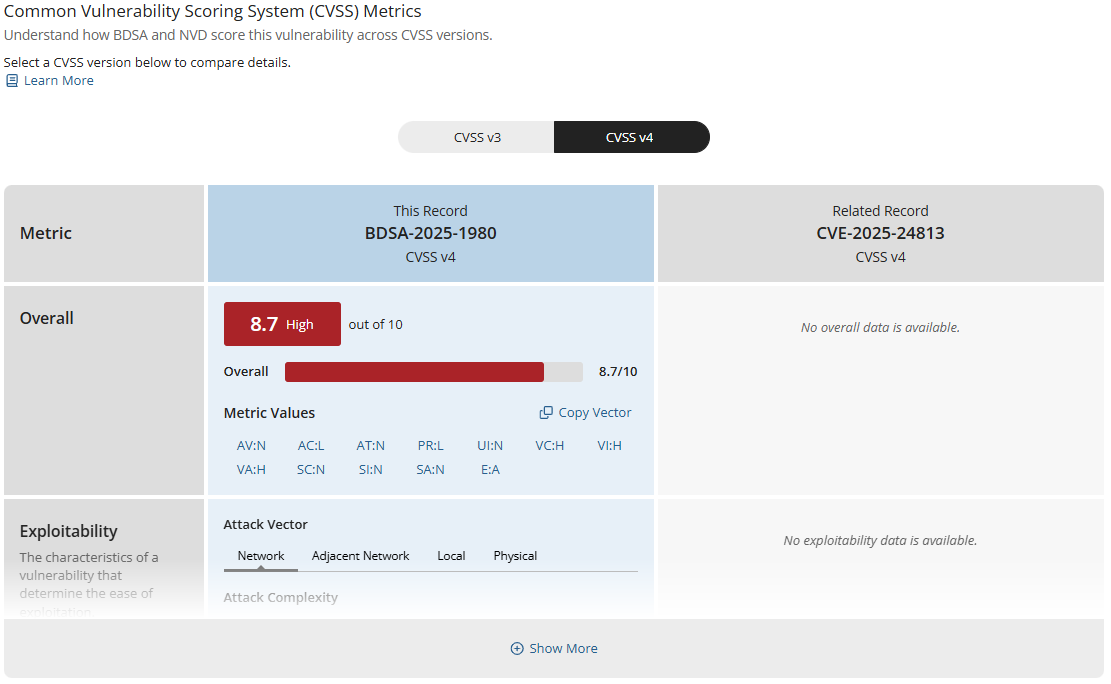
The Scores and Metrics section displays the scores for the related BDSA and NVD records (if applicable), based on the Common Vulnerability Scoring System (CVSS). Select a value above the graph to view the information in the graph and details below.
This section may also display a comparative, side-by-side graph if the vulnerability also has a NVD record.
Affected Projects tab
Select this tab to see a list of your projects that are affected by this vulnerability.
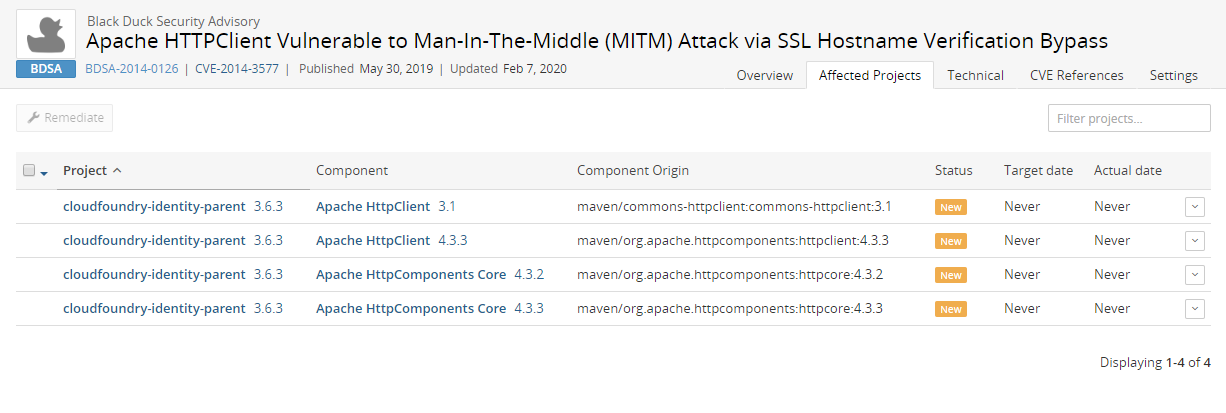
This tab lists all projects affected by this vulnerability:
-
Project name and version affected by this vulnerability.
-
Component name and version that contains this vulnerability.
-
Component origin that contains this vulnerability.
-
Remediation status of this vulnerability. Possible values are: New, Needs review, Mitigated, Patched, Duplicate, Remediation Required, Remediation Complete, or Ignored.
-
Target date for remediating this vulnerability.
-
Actual date this vulnerability was remediated.
Select  in the row of a
project and select:
in the row of a
project and select:
-
View all vulnerabilities to view all vulnerabilities affecting this project version.
-
View related files to view to display the Source tab filtered to display the affected files.
Use this tab to remediate the vulnerability for one or more projects by origin:
- In the row of the single project you want to remediate, do one of the following:
Select
, select Update Remediation Plan, enter the
remediation details, and click Update.Select
 and click Remediate. Enter the remediation details,
and click Update.
and click Remediate. Enter the remediation details,
and click Update.
-
For multiple projects that need the same remediation status, select
in each row and click Remediate. In the Bulk Remediation
dialog box, enter the remediation details, and click Update
Technical tab
Select the Technical tab to view a technical description and a list of references and related links.
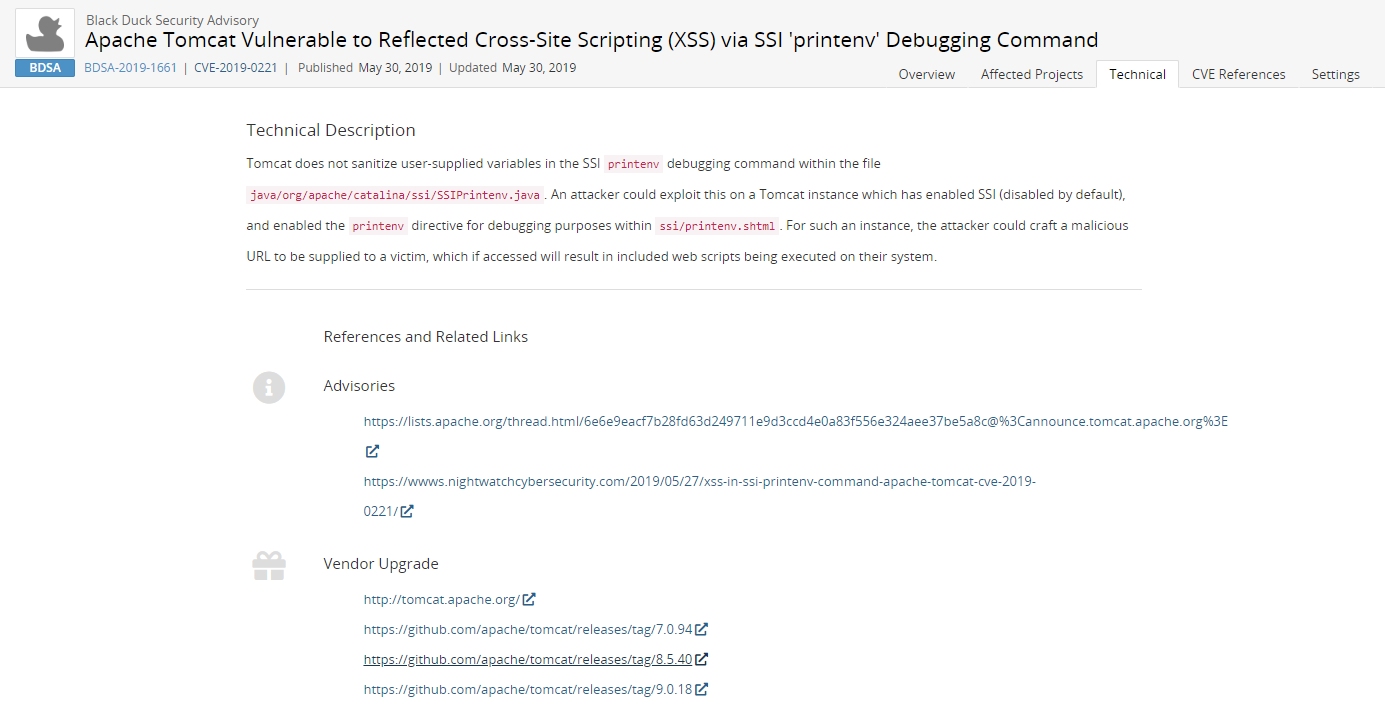
Included in the References and Related Links section is a list of Key Events:
-
Discovered. Date that the vulnerability was discovered.
-
Vendor Notified. Date the official vendor was notified of this vulnerability.
-
Vendor Fix. Date that the official vendor released a patch or upgrade to fix this vulnerability.
-
Disclosure. Date the vulnerability was first publicly disclosed, whether as a bug or as a security vulnerability.
-
Vulnerability Age. Today's date - Disclosure date.
-
Exploit Available. Date an exploit became publicly available for this vulnerability.
Components tab
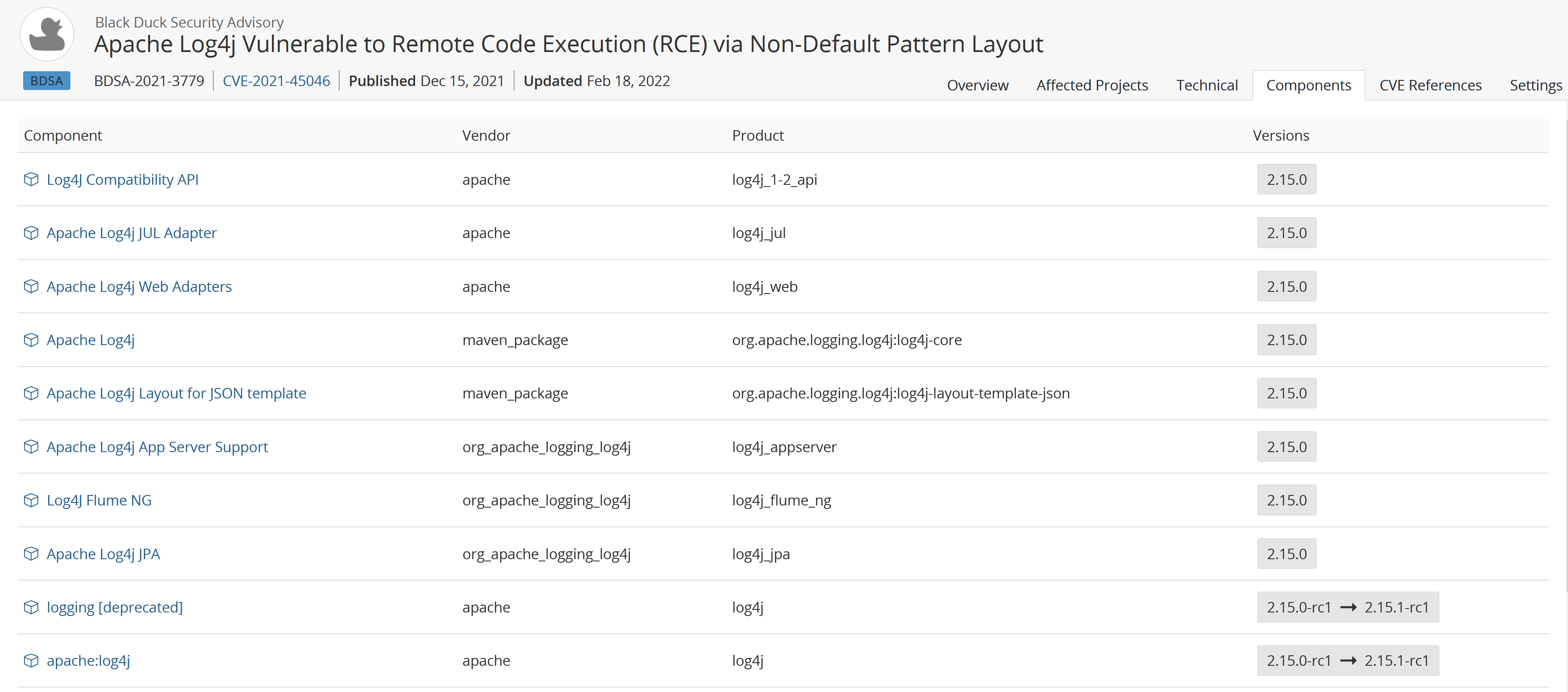
Select the Components tab to view a list of all known component versions affected by this particular BDSA vulnerability record.
CVE References tab
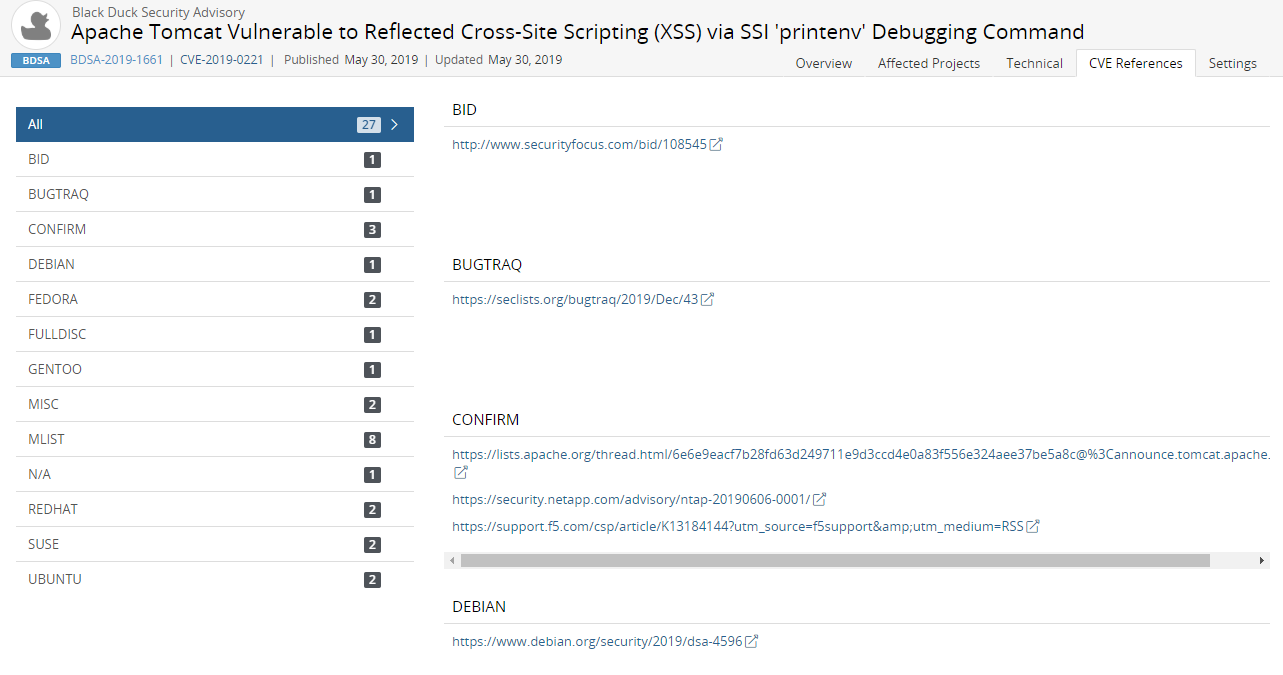
Select the CVE References tab to view links for additional information.
Settings tab
Use this tab to manage the global remediation for this vulnerability. Click here for more information.